



How to Fix Printhead Vertical Calibration –Step-by-Step
Printhead Vertical Calibration to Eliminate Color Differences in Inkjet Printing
When there is a color difference between two adjacent color blocks, observe the intersection of the five lines on both sides to determine,the direction of the printhead deviation.
After completing the standard vertical calibration pattern, if there is no color difference in the nozzle check pattern, it indicates that the current physical vertical position of the printhead is optimal.
To adjust the color difference between printheads, first adjust the color blocks in the nozzle check pattern to the state where no color difference is visible.
If there is a conflict between the standard vertical calibration pattern and the nozzle check pattern (when adjusting one causes the other to be incorrect), use the nozzle check pattern as the reference.
In the printing software, under the [Calibration] menu and the [Printhead Installation] option, select the [Vertical Check] tab. Choose to print the vertical check pattern to produce the corresponding calibration chart as shown below:
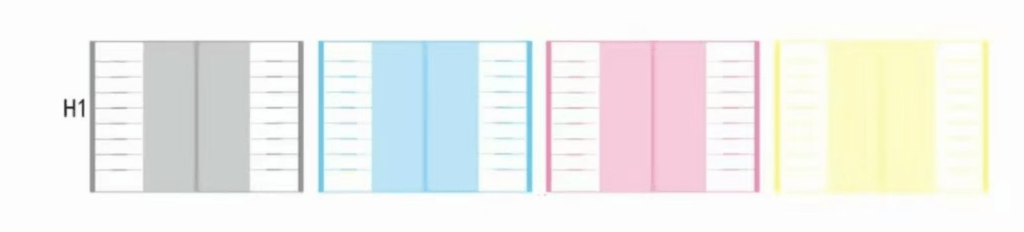
Our primary focus is on testing the leftmost unit, as shown in the illustration below:


Note:
- The depth of the two color blocks in the middle does not indicate the rotation direction of the printhead. It only serves as a reminder that the printhead position is not correctly calibrated. In such cases, the printhead will produce color deviations in printing.
When the vertical alignment of the printhead nozzle check is incorrect, the color blocks in the middle will show a noticeable difference in depth, as illustrated below:

The direction of the printhead deviation can be determined by checking the relative position of the two black lines and the red lines. Similar to the standard vertical calibration chart, the printhead nozzle check pattern also has three possible states:
(See next page for details)
This test pattern can be divided into two parts, which are now
shown in different colors to indicate these sections:

The red part represents the fixed position, serving as a reference position.
The black part represents the printhead’s position, indicating its current status.
The normal state is when the two symmetrical color blocks in the middle have the same color, and the stripes on both the left and right sides align perfectly in the center.


